
Tonal balance is the overall spread of a mix's energy across the frequency range, from the sub bass up to the air at the top. A mix with good tonal balance sounds neither heavy nor thin, neither dull nor harsh, and it keeps that character on earbuds, a car system and a club rig. You check it by comparing your mix at matched loudness with released songs in the same style, and by looking at its long-term spectrum next to a target curve.
This guide explains what tonal balance means, what a typical commercial mix looks like, how to check yours, and what the measurements can't tell you.
What tonal balance means in music
Every instrument in a mix covers part of the frequency range. The kick and bass fill the lows, guitars and keys the mids, cymbals and vocal sibilance the highs. Tonal balance is the sum of all of them over the whole song. It is a property of the mix, not of any one track.
That is why a mix can have a well recorded bass and a clear vocal and still sound wrong overall. If the low mids pile up from five instruments at once, the whole mix turns thick. If every part is a little bright, the sum turns harsh. You hear tonal balance most clearly when you step back from the parts and listen to the whole song as one sound.
Tonal balance matters because of translation. A mix that is too heavy in the lows booms in a car and sounds fine on a laptop. A mix that is too bright sounds exciting on studio monitors and tiring on earbuds. A balanced mix keeps its shape on more systems.
What a typical mix looks like
Commercial mixes are not flat on a spectrum graph. When you average a released song over its whole length, its level falls as the frequency rises. A common approximation is a slope of about −4.5 dB per octave. Each time the frequency doubles, the level drops by about 4.5 dB. So a mix that looked flat on such a graph would sound very bright.
That slope is a general approximation, not a rule. Genres sit in different places around it. A bass-led club track sits above it in the lows; a solo acoustic recording often sits below it there. Treat a target curve as a range that most mixes fall inside, and use reference tracks in your genre to see where inside that range your style belongs.
A target curve also says nothing about the arrangement. A song with no bass part will sit far below the curve in the lows, and that is a choice, not a mistake.
Check tonal balance by ear
Your ears are the first check, and the measurement only confirms what you hear. Two things make listening reliable.
Match the loudness first
Ears are less sensitive to lows and highs at low levels, as the equal-loudness contours in ISO 226 show. Turn a song up and it sounds fuller and brighter; turn it down and it sounds thinner. So loudness changes how you hear tonal balance. If your reference is louder than your mix by even about 1 dB, the reference can seem to have better lows and highs for that reason alone. Turn the louder file down to the quieter one's integrated LUFS before you compare. The level matching guide explains how.
Also keep your listening volume steady from one session to the next. A mix balanced at a very low volume tends to end up with too much low end and top when played loud, and the reverse.
Compare with references
Pick two or three released songs close to yours and switch between them and your mix at the same point in the song. Ask broad questions. Does mine have more weight or less? Is the top end harsher or duller? Do the mids sound more crowded? How to use reference tracks covers choosing them and switching well.
Check tonal balance on a graph
A graph helps when your ears have adjusted to the mix, or when your room or headphones exaggerate part of the range. There are two useful views.
- Long-term spectrum against a target. Average the whole song and draw it next to a target slope. Look for bands that leave the range: a bump in the low mids, a dip in the presence range, a top end that falls away early.
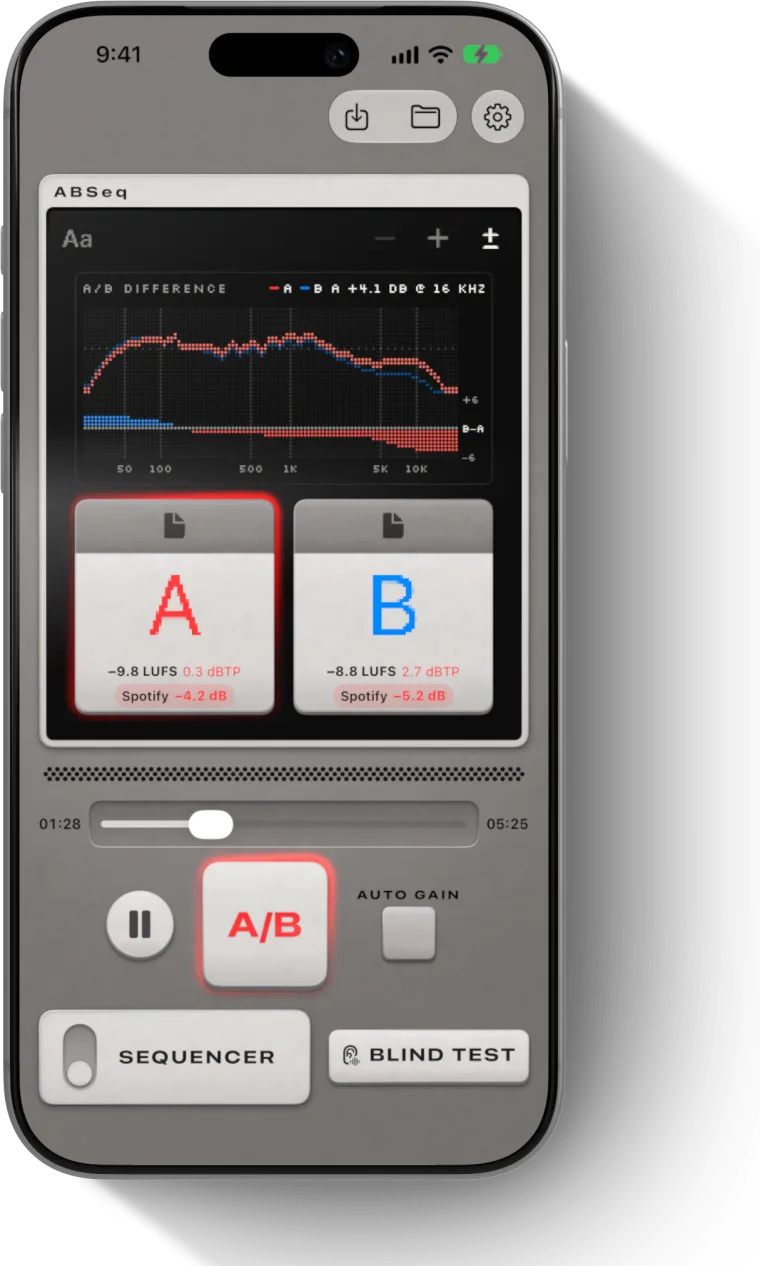
- Difference against a reference. Match the loudness of your mix and a reference, then subtract one spectrum from the other band by band. The result shows where one has more than the other, in dB.
A short-term spectrum analyzer shows what is playing right now, which is useful for finding a single resonance. For tonal balance you want the long-term view, because the balance of a chorus differs from a verse and you are judging the song.
Checking tonal balance on a phone
ABSeq's TONE graph is one way to check tonal balance on iPhone or iPad. It draws the song's long-term balance against a slope of about −4.5 dB per octave, inside a shaded range. Its A/B graph matches two tracks' loudness and shows where one has more than the other, band by band, with the biggest gap named in the headline, for example "B +2.1 dB @ 63 Hz". Both are Pro graphs; the 39-band spectrum is free. The graphs are computed once when the file loads, and the bands below about 125 Hz are coarse, so read small differences in the lows with care. The graphs section of the help guide describes each view.
Fixing tonal balance in a mix
When a mix leans one way, the cause is usually a few tracks, not the mix bus. Find which parts add to the problem band and adjust them first. If the low mids are thick, check which instruments overlap there and cut the ones that need it least. If the top is harsh, look at the brightest few sources before you touch the whole mix.
Broad, small EQ moves on the mix bus are for the last part of the correction, once the tracks are close. A narrow cut on the mix bus affects every instrument in that band at once.
After each change, bounce and compare again at matched loudness. If you are choosing between masters, the same check applies: see how to compare masters.
What the measurements can't tell you
A graph shows energy, not how good a mix is. Two mixes with the same long-term spectrum can sound very different, because one has a clear vocal and the other has it buried. A mix can sit outside the shaded range on purpose and still be right for the song. Use the target as a sanity check after you listen, not as the goal.
Questions
What is tonal balance in music?
Tonal balance is the overall spread of a song's energy from the lows to the highs, heard as one shape. A balanced mix sounds neither heavy nor thin, neither dull nor harsh, and keeps that character on different speakers and headphones.
How do you check tonal balance when mixing?
Match the loudness of your mix and two or three reference tracks, switch between them at the same point in the song, and listen for weight, brightness and crowded mids. Then look at your mix's long-term spectrum against a target slope, or at a difference graph against a reference.
What target curve should a mix follow?
A common approximation for commercial mixes is a slope of about −4.5 dB per octave across the long-term spectrum. It is a general range, not a genre target: bass-heavy styles sit above it in the lows and sparse ones below, so compare with references in your genre.
Is there a tonal balance alternative on a phone?
Yes. ABSeq's TONE graph on iPhone and iPad shows a song's long-term tonal balance against a slope of about −4.5 dB per octave in a shaded range, and its A/B graph shows band by band where your mix differs from a reference after loudness matching.