
Level matching, also called loudness matching or gain matching, means setting two versions of a track to the same loudness before you compare them. Measure the integrated loudness of each file in LUFS, then turn the louder one down by the difference. Without it, the louder version tends to win, because ears hear more lows and highs at higher levels. A difference of about 1 dB is enough to tilt the choice.
Why louder sounds better
Ears are less sensitive to low and high frequencies at low levels. ISO 226 describes this as a set of equal-loudness contours, often called the Fletcher-Munson curves. As the level goes up, bass and treble become easier to hear compared with the midrange.
So when you turn a mix up, it sounds fuller in the low end and brighter on top, even though nothing in the mix changed. In a comparison, your ears read that extra level as a better mix. A master that is 1 dB louder than the mix it came from can win the comparison on level alone, and you learn nothing about what the mastering did.
This is why the rule in mixing and mastering is to match levels before you judge. It applies to every comparison: two mix revisions, a mix and its master, two masters, a plugin on and off, and your mix against a reference in an A/B test.
Match by LUFS, not by peak
A peak meter shows the highest level in the file. It says little about how loud the file sounds. Two masters can both peak at −1 dBTP and still be several LU apart, because one is more compressed and limited and sits closer to its peak for more of the song.
Plain RMS gets closer, but it treats all frequencies the same. LUFS, defined in ITU-R BS.1770 and EBU R128, applies K-weighting first. That is a high-shelf boost and a low cut that approximate how ears hear. So a bass-heavy mix doesn't read louder than it sounds. One LU is a change of 1 dB, so a difference in LUFS converts straight into a gain offset.
Use integrated LUFS to match whole files. Integrated loudness covers the whole programme and uses gating: an absolute gate at −70 LUFS and a relative gate 10 LU below the ungated level. Silence and quiet gaps don't pull the reading down, so a version with a longer intro still compares fairly. The guide to LUFS explains integrated, short-term and momentary readings.
How to level match two or more files
- Measure the integrated LUFS of every file you want to compare.
- Find the quietest file. It is the reference level, and it stays at 0 dB.
- Turn each other file down by the difference between its reading and the quietest one.
- Don't turn the quietest file up. Adding gain to a file that peaks near 0 dBFS pushes it over and clips it.
- Play a loud section and a quiet section of each, and check by ear that neither version jumps out.
Here is a worked example with a mix, a master of that mix, and a released reference track.
| File | Integrated loudness | Gain to match |
|---|---|---|
| A, mix | −12.4 LUFS | 0 dB (quietest) |
| B, master | −8.9 LUFS | −3.5 dB |
| C, reference | −7.6 LUFS | −4.8 dB |
After the offsets, all three play at −12.4 LUFS. Now a preference for the master tells you something about its tone and dynamics, because it no longer has 3.5 dB of extra level to hide behind.
Why you turn down, not up
Turning a quiet file up to meet a loud one adds gain to its peaks. A mix that peaks at −1 dBTP, turned up 3.5 dB, peaks at +2.5 dBTP and clips. Turning the loud files down to meet the quiet one removes that risk, and true peak stays below where it was. The true peak guide covers why peaks between samples matter for clipping.
Turn your monitor volume up afterwards if the matched level feels too quiet. The comparison stays fair, because every version moves by the same amount.
Level matching in practice
In a DAW, put a gain or utility plugin on each comparison track and enter its offset by hand. When you compare your mix with a reference, route the reference so it skips your master bus processing, or the offset you measured no longer applies. A level matching plugin does the measuring and the offset for you, and any gain plugin works if you do the arithmetic yourself.
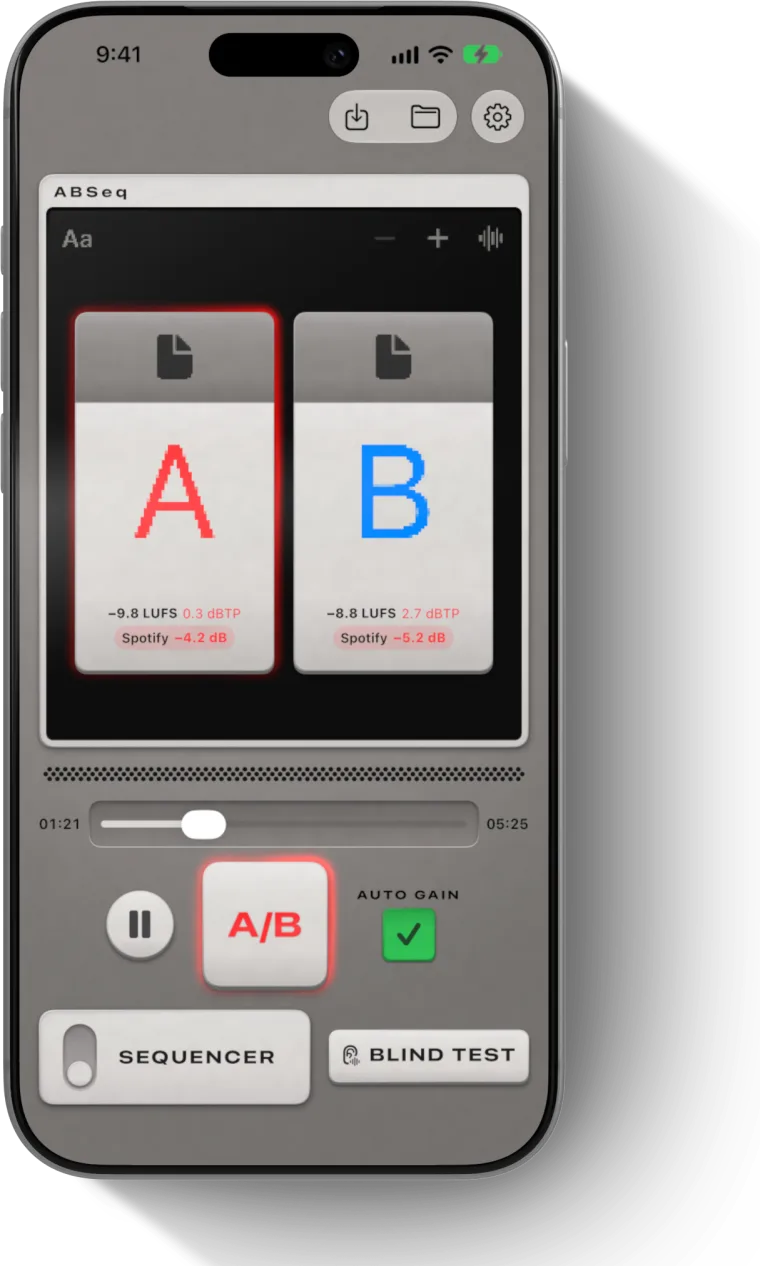
In ABSeq, Auto Gain does these steps for up to four files. It measures each file's integrated loudness and turns every track down to the quietest one. It never turns a track up, so nothing clips. A track still being measured plays at its own level until its reading is ready.
Streaming services match levels too
Streaming services already match levels for listeners. Spotify normalizes to −14 LUFS integrated by default, so it turns a −9 LUFS master down 5 dB and plays it at the same level as a −14 LUFS master. YouTube, Tidal and Amazon Music sit at about −14 LUFS, and Apple Music at about −16 LUFS with Sound Check.
So a master louder than the target isn't rewarded. It plays at the same level as a quieter one, with less dynamic range left. A level matched comparison is close to how a listener on those services will hear the difference. The loudness normalization guide covers each service's rules.
What level matching doesn't fix
Matching integrated loudness makes the whole files equal on average. One section can still differ. A master with a heavily limited chorus and a gentler verse can match the mix overall and still be louder in the chorus. If a single section sounds louder after matching, that is a real difference in dynamics, and it is part of what you are judging.
Level matching also doesn't hide which file is which. Once levels are equal, the next bias is knowing which version is new. A blind test removes that one.
Questions
What is level matching in mixing?
Level matching means setting two versions of a track to the same loudness before you compare them, so the louder one doesn't win only for being louder. Measure each file's integrated LUFS and turn the louder file down by the difference in dB.
Is loudness matching the same as gain matching?
In practice, yes. Both mean adjusting gain so two versions play at the same loudness. Loudness matching makes clear that you match what you hear, measured in LUFS, rather than peak level, which says little about how loud a file sounds.
Why does louder sound better?
Ears are less sensitive to lows and highs at low levels, as the ISO 226 equal-loudness contours (the Fletcher-Munson curves) show. A louder version sounds fuller and brighter, so even a difference of about 1 dB can make you prefer it.
Should I level match by peak or by LUFS?
By LUFS. Two files can peak at the same level and differ in loudness by several LU, because compression and limiting change how loud a file sounds without changing its peak. Integrated LUFS measures the whole file, K-weighted to approximate hearing.
How big a level difference affects an A/B comparison?
About 1 dB is enough to bias which version you prefer. That is small enough that you may not notice one version is louder, so measure and match rather than trusting your ears to set the levels.