
A spectrum analyzer draws the level of a sound across the frequency range, with low frequencies on the left and high ones on the right. In mixing you use it to confirm something you already hear, to see low end that your speakers or headphones don't reproduce well, and to compare your mix with a reference track. It works best as a second opinion. Listen first, look second, and compare two spectra only after you have matched their loudness.
What a spectrum analyzer shows
The horizontal axis is frequency, usually on a logarithmic scale so that each octave takes the same width. The distance from 50 Hz to 100 Hz is as wide as the distance from 5 kHz to 10 kHz, which matches how ears hear pitch. The vertical axis is level in dB. A tall bar or a high point on the line means more energy in that band.
What FFT means
Most analyzers use an FFT, a fast Fourier transform. It takes a short slice of audio and splits it into many narrow frequency bins, each with its own level. The analyzer then draws those bins, or groups them into wider bands so the display is easier to read. A 39-band display from 25 Hz to 20 kHz, for example, groups the bins into 39 bands across that range.
An FFT spaces its bins evenly in Hz, but the display spaces bands evenly in octaves. So the top octave gets many bins and the bottom octaves get very few. That is why the low end of an analyzer is the least precise part of the display: below about 125 Hz, a band may rest on only a handful of bins.
Real-time and long-term views
A real-time analyzer shows the last fraction of a second and moves with the music. It is good for finding a single ringing note or a resonance in one instrument. A long-term view averages the whole song into one curve. It is the one to use for overall tonal balance, because a verse and a chorus can look very different from moment to moment.
How to use a spectrum analyzer when mixing
- Listen first. Decide what you think is wrong before you look. "The low mids sound thick" gives you a band to check. Looking without a question leads to EQ moves that fix the picture and not the sound.
- Look for the band you heard. Find the bump, dip or ringing peak that matches what bothered you. If you can't find it, the problem may be timing, distortion or level, which a spectrum doesn't show.
- Solo or mute to find the source. Put the analyzer on the mix, then mute tracks one at a time until the bump shrinks. That tells you which part to fix.
- Make a small change and listen again. Check the result by ear. The analyzer confirms the change; your ears decide whether it is better.
Reading the low end
The low end is where an analyzer helps most and misleads most. It helps because small speakers, laptops and many headphones reproduce little of the deepest bass, so you can't hear whether it is there. An analyzer shows rumble, a sub bass that is far louder than you meant, or a kick and bass both peaking in the same band and masking each other.
It misleads because of resolution. With few bins below about 125 Hz, two notes a few Hz apart can land in the same band, and one band can swing several dB as the bass line moves. Read the lows as a broad picture. Don't chase a 1 dB difference in a single low band.
Check the low end on more than one system as well. A car or a set of headphones you know well tells you what the analyzer can't: whether the bass sounds right.
Comparing two spectra
Comparing your mix's spectrum with a reference, or one version with another, is one of the most useful things an analyzer does. Three conditions make the comparison fair.
- Matched loudness. A reference that is 6 dB louder sits 6 dB higher across the whole graph, and the curves stop being comparable. Turn the louder file down to the quieter one's integrated LUFS first. The same matching keeps your ears fair too: a louder version sounds fuller and brighter, and even about 1 dB can bias a comparison. See level matching.
- The same section. Compare chorus with chorus. A breakdown with no drums looks nothing like a full chorus.
- The same view. Use the same analyzer settings for both, and use long-term averages when you judge the whole song.
Choose the references with care, too. A song in another genre will differ from yours on the graph for reasons that have nothing to do with mix quality. How to use reference tracks covers picking them.
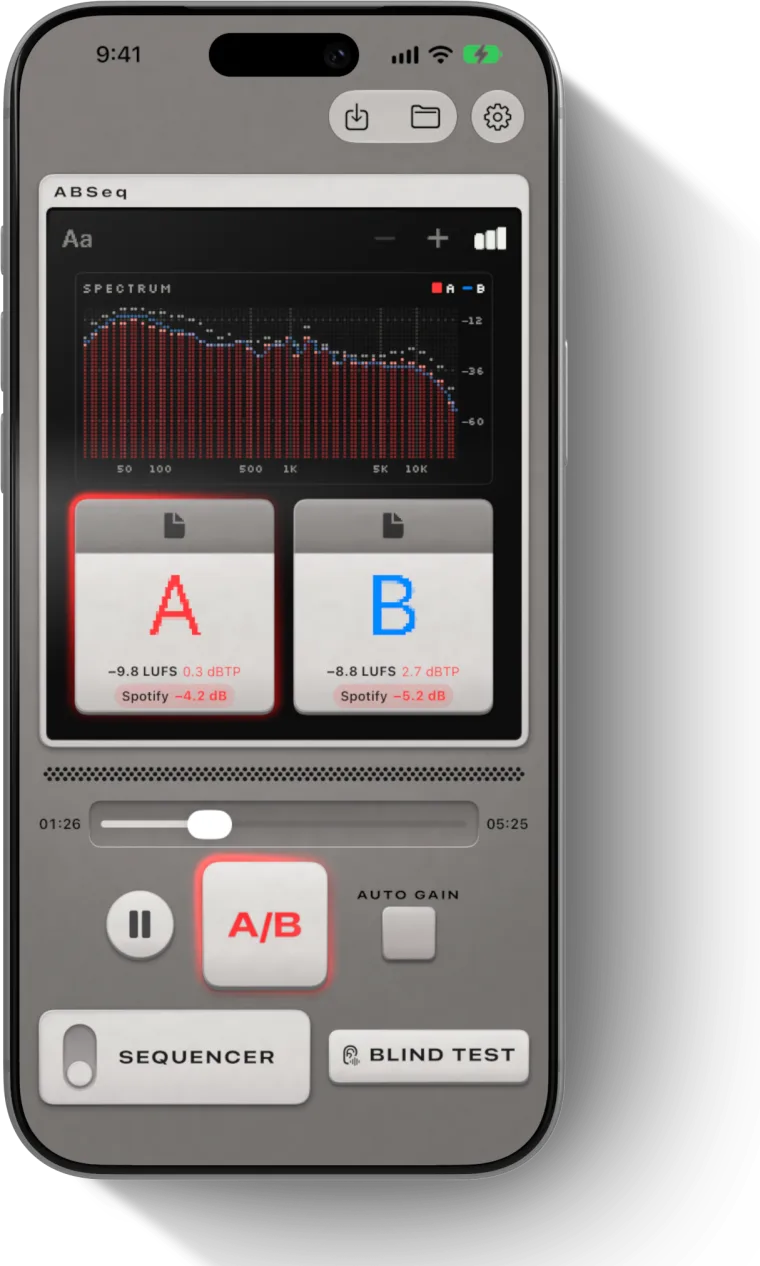
ABSeq shows a free 39-band FFT spectrum from 25 Hz to 20 kHz on iPhone and iPad, with the track you are hearing as bars and the compared track as a line. Auto Gain turns every track down to the quietest one's integrated loudness, so the two curves start from the same level. Its Pro A/B graph goes one step further and shows the difference band by band, naming the biggest gap, for example "B +2.1 dB @ 63 Hz". The spectrum section on the home page shows the view.
Common mistakes
Expecting a flat line
A finished mix does not look flat. Averaged over a song, commercial mixes fall toward the highs, by about −4.5 dB per octave as a general approximation. A mix that looked flat would sound very bright. Compare with references in your style rather than with a straight line.
Mixing by eye
A spectrum shows energy per band and nothing else. It doesn't show whether the vocal is clear, whether the snare cuts through, or whether the mix sounds good. Two mixes with the same curve can sound very different. If your ears and the graph disagree, check your monitoring, then trust your ears.
Reading single moments
A real-time display jumps with every hit. A snare crack lights up the mids for an instant, and a held bass note fills the lows. Judging the balance from one frozen frame tells you about that moment, not the song. Use a long-term average for balance, and the real-time view for finding specific events.
Questions
How do you use a spectrum analyzer for mixing?
Listen first and decide what sounds wrong, then find that band on the analyzer, mute tracks one at a time to find which part causes it, make a small EQ change and check the result by ear. Use it most for the low end, which small speakers and many headphones don't reproduce well.
What does a spectrum analyzer show?
It shows the level of a sound in each frequency band, with frequency on the horizontal axis, usually on a log scale, and level in dB on the vertical axis. A real-time view shows the last fraction of a second; a long-term view averages the whole song.
What is FFT in audio?
FFT stands for fast Fourier transform. It splits a short slice of audio into many narrow frequency bins and gives each a level. Analyzers draw those bins or group them into bands, such as 39 bands from 25 Hz to 20 kHz. The bins are spaced evenly in Hz, so the low end gets the fewest.
Should my mix look flat on a spectrum analyzer?
No. Averaged over a song, commercial mixes fall toward the highs, by about −4.5 dB per octave as a general approximation. A mix that looked flat would sound very bright. Compare with released songs in your genre at matched loudness instead.
How do I compare the spectrum of two audio files?
Match their integrated loudness first, then compare the same section of each with the same analyzer settings. Overlay the two curves, or use a difference view that subtracts one from the other band by band to show where one file has more level.