
A reference track is a released song that you play next to your own mix or master so you can hear what yours is missing. It works only if the comparison is fair. Choose songs that sound like the record you are making, match their loudness to your mix before you listen, and switch between the two at the same moment in the song. Then listen for one thing at a time: the low end, the vocal level, the brightness, the width.
What a reference track is for
Your ears adjust to whatever they hear. After an hour on one mix, a dull top end starts to sound normal. A released song is a fixed point, so it tells you how far your mix has drifted.
You are not trying to make your song identical to someone else's. You are checking whether your kick is far quieter than every comparable record, or your vocal sits a few dB louder than anyone else would put it.
A "reference mix" can also mean your own earlier version. Comparing today's bounce with yesterday's is referencing too, and it catches changes that made things worse. See how to A/B test a mix or master for that side of it.
How to choose reference tracks
The best reference track for mixing is one that is close to your song, not a famous one. Use these checks.
- Same genre and arrangement. A sparse acoustic song makes a poor reference for a dense club track. Match the instruments and how busy the arrangement is.
- Similar tempo and key area. Low end behaves differently in a slow song in a low key than in a fast one higher up. The closer the match, the more the bass comparison tells you.
- A sound you would be happy to have. Pick records whose mix you like.
- The best file you can get. Use a lossless file, such as a WAV or FLAC you bought, rather than a low bitrate copy. A file that has lost its top end will mislead you about brightness.
Two or three references are enough. With more you start averaging songs that disagree with each other, and the session turns into a playlist. Pick the part of each song that matches the part of yours you are working on: the chorus against your chorus, the breakdown against your breakdown.
References for mastering
For mastering, the same rules apply, with one more check. Look at how loud the reference is and what its true peak is before you copy its loudness. Many released masters are far louder than the −14 LUFS that Spotify normalizes to, and Spotify turns them down to that level when normalization is on. A louder master isn't rewarded; it plays at the same level as a quieter one, with less dynamic range left.
Match the loudness before you listen
A released master is usually louder than a mix in progress. If your mix reads −18 LUFS integrated and the reference reads −9 LUFS, the reference plays 9 dB louder, and you will hear it as fuller and brighter for that reason alone. Ears are less sensitive to lows and highs at low levels, as the equal-loudness contours in ISO 226 show. Even a gap of about 1 dB can bias a comparison.
So turn the reference down to your mix. Don't turn your mix up to the reference, because you will push it into clipping or into a limiter that changes how it sounds. Measure both files' integrated LUFS and lower the louder one by the difference. In the example above that means turning the reference down 9 dB.
Integrated LUFS measures the whole file, so a reference with a long quiet intro can read lower than its chorus sounds. The level matching guide covers this in more detail.
What to listen for
Listen for one thing per pass. Judging everything at once tells you only that the songs differ.
- Low end. How loud are the kick and bass compared with the rest? Which one is on top?
- Vocal level. Does the lead vocal sit above the music, inside it, or behind it? Many mixes in progress have the vocal too quiet or too loud by a few dB.
- Brightness. Is your top end harsher or duller than the reference's? Listen to cymbals, the "s" sounds in the vocal, and the attack of the snare.
- Overall tonal balance. Step back and hear the whole mix as one shape. A mix can have every part in order and still sit heavier or thinner overall. Tonal balance explains how to check this.
- Width and dynamics. How wide are the pads, and how much louder is the chorus than the verse?
Switch at the same point in the song, at short intervals. If you play 30 seconds of the reference and then go back to the start of your mix, you are comparing your memory of one with the sound of the other. Switching in sync, every few seconds, removes that gap.
Write down what you hear, then change one thing and listen again. If your low end sounds heavier than the reference, a spectrum analyzer can show which band is doing it.
Referencing inside a DAW
Ableton Live, Logic Pro, FL Studio, Pro Tools and Reaper all handle referencing in much the same way. The menus differ, but the setup is the same.
- Put the reference on its own track. Import the file into your session and line it up with your song so the same section plays at the same time.
- Keep it out of your master bus processing. If your mix bus has a compressor, EQ or limiter on it, the reference should not pass through them. Route the reference track straight to the output, around the master chain. Otherwise you hear the reference through your own processing.
- Lower its level on the track. Use the fader or a gain plugin on the reference track to bring it down to your mix's loudness. Check with a loudness meter that both read the same integrated LUFS.
- Switch with mute or solo. Mute the reference and unmute your mix, or solo one and then the other. Some DAWs and plugins let you switch with a single key, which makes short, frequent switches easier.
The advantage of referencing in the DAW is speed. You hear a change to your mix against the reference straight away, without bouncing. The drawback is that you are listening in the room and on the speakers you mix on, which are the ones your ears have already adjusted to.
Referencing a bounce on a phone
Referencing a bounce on a phone answers a different question. In the DAW you ask "is this mix heading the right way?" On a phone you ask "does the finished file hold up where people will hear it?" You listen to the exact bounce you would send, through earbuds, headphones, a Bluetooth speaker or the car, away from the studio monitors.
The same rules apply: matched loudness and switching in sync. ABSeq does both on iPhone and iPad. Load your bounce and up to three references as tracks A to D, and Auto Gain turns every track down to the integrated loudness of the quietest one, usually your mix. The A/B key then switches to the next track at the same moment in the song. Each tile also shows integrated LUFS and true peak, so you can see how much louder the reference was before matching.
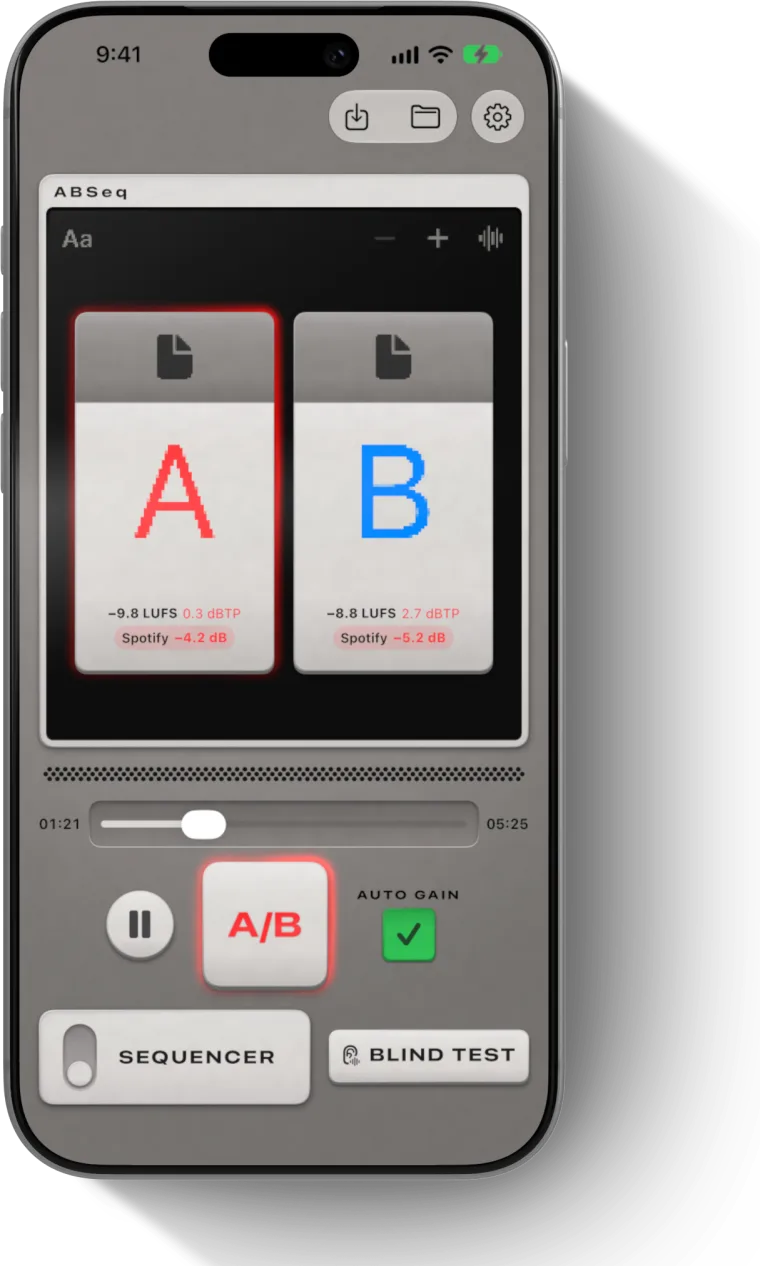
Make a change in the DAW, bounce, and check the bounce against the same references on the phone. If the problem is gone and nothing new has appeared, keep the change.
Questions
How do you use reference tracks for mixing?
Pick two or three released songs close to yours in genre, arrangement and tempo. Turn them down to your mix's integrated loudness, then switch between your mix and a reference at the same point in the song, every few seconds. Listen for one thing per pass, such as the low end or the vocal level, and change one thing at a time.
How do I use reference tracks in Ableton, Logic Pro or FL Studio?
The method is the same in each. Import the reference onto its own track, line it up with your song, route it straight to the output so it skips your master bus processing, lower it to your mix's loudness, and switch with mute or solo. Only the menus differ between DAWs.
What is the best reference track for mixing?
The one closest to your song in genre, arrangement, tempo and key, with a mix you like, in a lossless file. A famous record in a different style tells you less than a lesser known song that sounds like the one you are making.
What is a reference mix?
A reference mix is any finished version you compare your work with. Usually it means a released song in the same style, but your own earlier bounce works as a reference too, and comparing against it shows whether a change made the mix better or worse.
Should I match my master's loudness to my reference tracks?
Match levels while you compare, but don't copy a very loud reference's loudness without a reason. Spotify normalizes to −14 LUFS by default and turns louder masters down, so a master louder than that plays at the same level with less dynamic range left.